top of page
a group of diverse people in a modern library or co-working space enjoying free resources they can download or print out

 RESOURCES

An informative flyer titled 'Printing Tips', designed in a vertical layout. The background is teal with a white decorative top border. At the top, the title is emphasized in a larger, bold white font. Below the title, the flyer lists three main tips for printing: 1. Select draft, standard or normal mode for everyday documents, with an accompanying graphic of a printer. 2. Use your control panel instructions, depicted with an icon of a control panel. 3. Fixes for bad prints, accompanied by a graphic of a crossed-out printer error. Each tip is highlighted in a separate yellow box with corresponding illustrative icons, making the content visually accessible and easy to understand.

Printing Tips

Tips for common printing problems.

An informative flyer titled 'When It's Time to Replace Your Printer', designed with a soothing color palette of light green and white. The flyer highlights three main indicators that it’s time for a new printer. 1. High repair costs: If your printer's repair costs are higher than its value, it might be time to consider a replacement. This point is illustrated with an icon of a broken printer and money symbols. 2. Outdated technology: If the printer lacks modern features like mobile connectivity or energy efficiency, it might not meet current standards. Represented by a thumbs-down icon. 3. Improve productivity: A new printer can boost office productivity, depicted with a check mark and an upward trend graph. Each point is neatly separated with bold headings and is accompanied by relevant icons, making the content both eye-catching and easy to digest.

How to Know When It’s Time to Replace Your Printer

Does your office technology need to be upgraded? Here are 7 points to take a look at.

An engaging flyer titled 'How to Keep Your Electronics Clean' with a vibrant orange and teal color scheme. The top section features the title in large white text on an orange background, decorated with abstract shapes. Below the title, a brief introduction in smaller white font states: 'Here are some tips on how to keep your office and home electronics clean.' The main body of the flyer, set against a teal background, outlines tips specifically for printers and multifunction devices. It includes instructions like 'Lightly moisten a soft, lint-free cloth with a water and isopropyl alcohol solution' and 'Ensure surfaces have air-dried before powering the device on.' Each tip is accompanied by friendly, cartoon-style icons illustrating the cleaning process, making the tips easy to follow and visually appealing

How to Keep Your Electronics Clean

Tips on how to clean the different devices found at work or home.

An informative flyer titled 'Benefits of a Maintenance & Supply Contract', presented in a clear and structured layout. The flyer's background is a gradient of blue to gray, adding visual appeal. At the top, a headline explains the main benefits: 'Supply Costs vs. Predictable Pricing', emphasized by icons of a piggy bank and a calculator. The flyer describes how the contract works, including cost control and eliminating large supply expenses. Visual elements like arrows and simple graphics guide the reader through the sections. Highlights include details on what the contract covers, such as toners, parts, and labor, with specific icons for clarity—truck for delivery, gears for parts, and a handshake for service agreements. The footer of the flyer features icons representing key advantages like financial management and efficiency, making the benefits easy to understand at a glance.

The Benefits of a Maintenance & Supply Contract

See how a maintenance and supply contract helps reduce downtime, manage supplies, and control print costs.

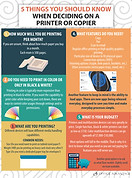
An educational flyer titled '5 Things You Should Know When Deciding on a Printer or Copier', creatively designed with a colorful and organized layout. The flyer features a circular, numbered guide from 1 to 5, with each point detailed in its own vibrant segment.

5 Things You Should Know Before Deciding on a Printer or Copier

Understand the key factors to consider before selecting a printer or copier.

Office Advantage logo with white OA monogram on a black background, representing professional IT, print, and business technology solutions.

Reach out to us at:
800-950-4665
info@officeadv.com
318 N Main St.
Mitchell, SD 57301

Subscribe to Our Newsletter

Connect with Us:

  • LinkedIn
  • Youtube
  • Facebook
  • X

© 2025 Office Advantage. All rights reserved.

bottom of page